Memaparkan catatan dengan label blogs. Papar semua catatan

Memaparkan status YM anda

  1. Login ke akaun blogger anda
  2. Pilih Layout >> Page Elements
  3. Klik pada Add A Gadget, pilih HTML/Javascript
  4. Masukkan kod di bawah

  5. <a href="ymsgr:sendIM?ID_YM_ANDA" target="_blank"><img src="http://opi.yahoo.com/online?u=ID_YM_ANDA&m=g&t=14&l=us" />
    </a>


  6. Tukar ID_YM_ANDA kepada ID YM anda sendiri.
  7. Nombor 14 di dalam kod mewakili imej yang akan dipaparkan. Anda boleh menukar nombor 14 kepada nombor lain dan lihat perbezaannya.
  8. Simpan dan lihat hasilnya

Menyusun atur gambar

Secara 'default' gambar yang diupload ke posting anda akan berada dalam 3 keadaan, kiri, kanan, dan tengah dengan 3 saiz, small, medium dan large. Setiap gambar juga akan disusun berjujukan ke bawah dengan 1 gambar bagi setiap baris. Pernahkan anda cuba menyusunnya supaya satu baris mempunyai 2 atau lebih gambar seperti gambar di bawah, tanpa menyunting gambar tersebut terlebih dahulu?


Secara defaultnya memang tidak boleh menyusun lebih daripada 1 bagi setiap baris. Cuba kaedah di bawah:


  1. Add image
  2. Edit HTML
  3. Delete bahagian bewarna kuning
Sekarang anda boleh menggunakan "Compose" untuk menyusun atur semula gambar yang telah di upload tanpa sebarang masalah.

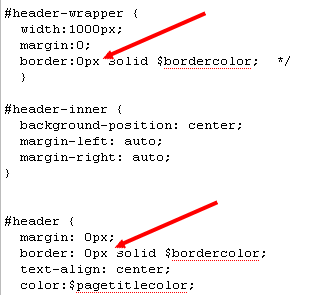
Membuang Border pada Header

  1. Sign In
  2. Pilih Layout >> Edit HTML
  3. Cari #header-wrapper dan #header
  4. Padam border:1px solid $bordercolor;
  5. atau tukarkan 1px kepada 0px untuk ubahsuai akan datang
  6. Preview dan Save

Memasukkan tandatangan di setiap post

Sesetengah blogger suka memasukkan tandatangan di dalam post mereka. Contoh tandatangan yang dimasukkan ialah seperti blog NANA+AMIRUL=DAMIA ini.

Untuk memasukkan tandatangan seperti ini, anda perlulah terlebih dahulu menyimpan imej tandatangan anda di internet cthnya gunakan imageshack atau photobucket, atau mana-mana image hosting yang boleh anda capai. Salin image link yang diberikan. cth: "http://img441.imageshack.us/img441/2145/signaturej.gif"

Langkah seterusnya adalah untuk memasukkan image link tersebut ke kod blog anda.

  1. Login ke akaun blog anda
  2. Klik pada Layout >> edit HTML
  3. Klik pada kotak expand widget template
  4. Cari kod <p class='post-footer-line post-footer-line-1'> atau seumpama dengannya. Gunakan shortcut ctrl+f untuk memudahkan carian
  5. Masukkan kod berikut di bawah kod tadi (Langkah 4) <img src='IMAGE URL' style='border: none; background: transparent;'/><br/>
  6. Gantikan IMAGE URL dgn image link yang anda salin sebelum ini. cth: <img src='http://img441.imageshack.us/img441/2145/signaturej.gif' style='border: none; background: transparent;'/> <br/>
  7. Preview dahulu sebelum simpan untuk elakkan sebarang masalah.
Selamat mencuba...

Popular blogs

Blog.com - Offers free blog hosting with unlimited bandwidth for their free package, more benefits for paid members.

Blog Ladder.com - All blog entries show up on the main ladder as well as inside your own blog.

Blogger.com - A great starting site to get a taste of blogging, very easy to use.

Blogr.com - Allows you to blog, host photos & videos, and podcasts.

BlogSpirit.com - European based blogging site, offers 30-day trial and subscription thereafter, but offers quite a bit of storage.

Blogster.com - Offers free image hosting in addition to free blogs.

BlogYx.com - Blogging site with extras such as chat boxes so you can interact with your readers.

Bloki.com - Lets you build a blog site and even open it up for collaboration.

Bravenet.com - Free blog hosting with RSS feeds and more.

ClearBlogs.com - Free blog hosting and offers templates, friends only posts, IP-Banning and more.

Etribes.com - Based in Europe, allows you to create all sorts of websites including a blog.

Multiply.com - Mixes blogging and social networking, with photo galleries and more.

Netcipia.com - Free blog and wiki for private or public display with 2GB of storage.

Open Diary.com - Offers unlimited storage and posts, low cost subscription rates for advanced features.

ShoutPost.com - A platform for creating blogs with a focus on generating traffic.

SoulCast.com - Have something you want to talk about, but want to say it anonymously? This may be the blogging site for you.

Squarespace.com - Lets you build your blog with numerous themes, also allows you to add other site features.

Terapad.com - Offers blogs as well as features such as an integrated store.

Tooum.com - Fully integrated blog and forum which allows for seamless discussion between the two.

Tumblr.com - A blog platform with a focus on allowing media-rich posts.

Weebly.com - Allows you to create a site and blog, free hosting and change designs on the fly.

Windows Live Spaces - Free blogging with your MSN account, only drawback is readers have to have an account also.

Vox.com - Part of the SixApart family of blogging sites, very much geared towards the personal journal types of blogs.

Xanga.com - Part social network, part blogging, all free.

Related Posts with Thumbnails